
Know what's in
every van.
Track materials across warehouses, vans and client sites in one live view. Allocate stock to jobs in a click — material costs flow straight into your job financials.
Trusted by 1,500+ UK contractors
From two-person crews to 200-strong firms.














The problem
Still counting stock
in a spreadsheet?
Buying gear you already own?
Materials live in three places — your warehouse, the lads' vans, a client's stock room — and nobody knows what's where. PaperDrop's Stock module is one shared, live view. The end of emergency Screwfix runs.
In plain English
What is stock management software for UK contractors?
Contractor stock management software tracks every material across every location it lives in — warehouse, van, client site — and feeds the cost of each allocation straight onto the job that consumed it. For UK contractors that means one live view of what's available where, in-app allocation from the van as the engineer fits the part, and accurate material-cost feed into each job's Financial Overview. The result: fewer emergency merchant runs, accurate margin, and a clean audit trail.
What's inside
One view, every location.
Real-time visibility
Quantities, costs and allocations across every location, live. No more spreadsheets that are stale by lunchtime.
Multi-location
Warehouses, client sites, engineer vans — each a tracked location with its own stock levels.
Allocate to jobs
One-click allocation. Stock quantities drop, job material costs go up — automatically.
Stock movement
Move materials between locations with full history. Traceability even when items are already allocated.
Filter and export
Filter by location, material or status. Export to Excel or CSV in one click — your data, your way.
Van stock that updates itself
Allocate from the van on a phone. Stock Managers see what's left to restock before vans return.
How it works
Add. Allocate.
Track.
01
Add stock
Bring in your materials list. Set locations — warehouse, vans, client sites — and starting quantities. Reuse the materials library from quoting.
02
Allocate to a job
On site, the engineer picks materials from their van's stock and allocates to the job. Office or finance sees the real cost in seconds.
03
Move and reconcile
Move stock between locations as the work moves. Run a report to see exactly what's where — and what needs reordering.
Real-time, across the board.
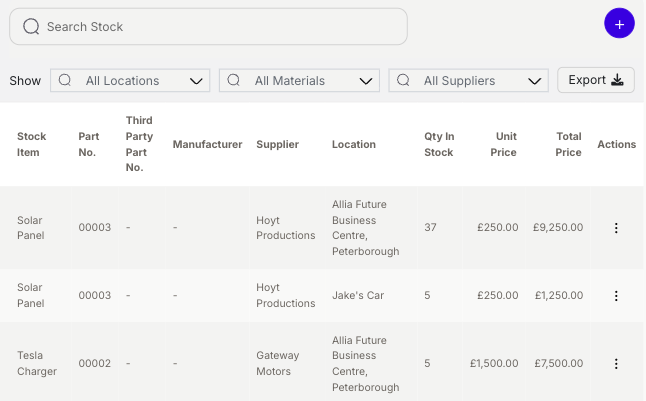
Quantities, costs and allocations for every material in every location — all live. Stop asking the lads what's on the van. Open PaperDrop and look.
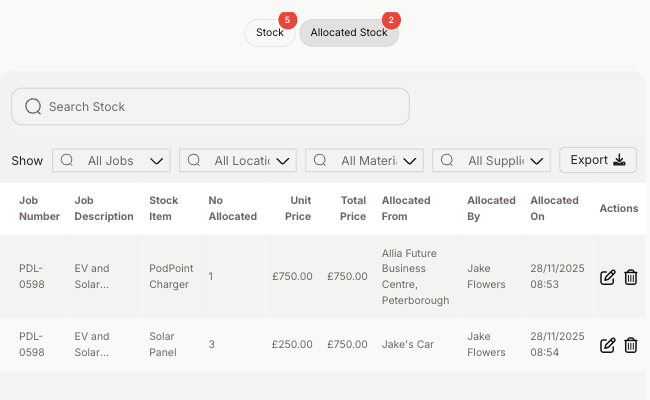
Allocate, and the costs follow.
Allocate stock to a job in one click. Quantities drop on the location, material costs land on the job's Financial Overview. Real costing, not guesses.
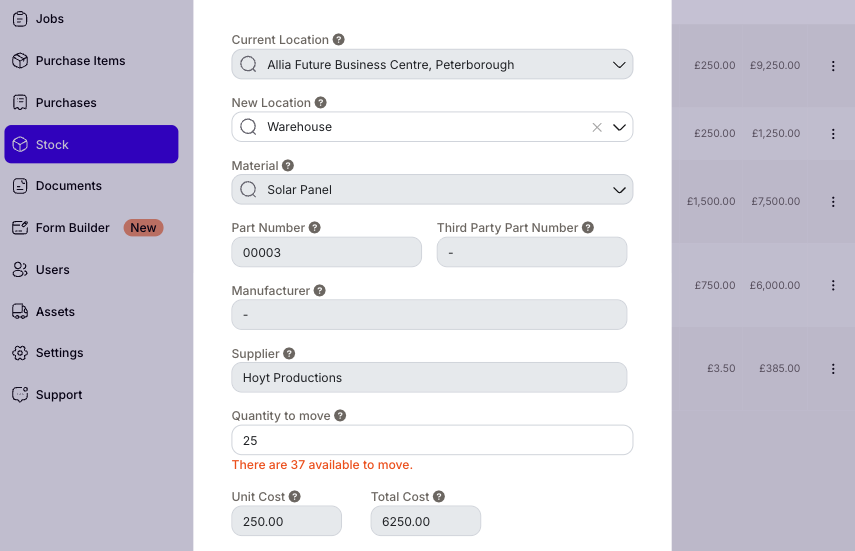
Track every transfer, even mid-job.
Move stock between vans, between sites, between warehouses — with full history. Items already allocated stay traceable. Auditors will love you.
“At first, the challenge was learning to trust PaperDrop.”
Jack Tooley
Tooley Eng.
Yes. Each van, client site, warehouse or container is a tracked location with its own stock levels. Engineers can allocate from their van on the phone; the office sees the change immediately.
Yes. When stock is allocated to a job, the material's cost lands on the job's Financial Overview alongside labour, mileage and other expenditure. No double-entry.
Yes — move stock between any two locations with full audit trail. Items already allocated to a job stay traceable through the move.
Yes — it's the same library. Add a material once; reuse it on quotes, purchases and stock allocations.
Yes. Filter by location, status or material and export to Excel or CSV in one click. No vendor lock-in.
Anyone who needs to add stock, move it between locations, or run stock reports. Engineers can still allocate stock to jobs without the role.
Pairs well with
Better together.
Job Costing
Allocated stock feeds the job's Financial Overview — quoted vs actual costs, by material.
Read morePurchasing
Need to restock? Raise a PO that pulls from the same Materials Library, then receive into stock.
Read moreScheduling
Schedule a job, allocate the van's stock to it, dispatch the engineer — one flow.
Read moreThe end of
emergency Screwfix runs.
See your own stock live across vans, sites and warehouse — takes 30 seconds, no card, no call.